
What Is Digital Marketing Attribution?

Digital marketing attribution is the process of deciding which marketing touchpoints
deserve credit for a conversion. A conversion can be a purchase, a form submission, or a
phone call. it is also known as Digital Marketing Attribution
Most customers don’t convert on the first visit. They might find you through search, read
an email a week later, and buy after clicking an ad. Attribution gives each of those steps a
share of the credit.
I got into this field through a simple interest in analytics and customer behavior. My day
to-day work involves tracking campaigns, analyzing customer journeys, measuring
conversions, and finding which channels deliver the best results. I’m still learning, and I’ll
point out where the data has limits.
Why Last-Click Credit Misleads You
The most common mistake I see is giving all the credit to the last channel before a
conversion. It’s easy to do, because last-click numbers are simple and they look
convincing.
The problem is what they hide. If you only look at the final interaction, you overlook
everything that built interest earlier.
An Illustrative Example
This scenario is an illustration, not a client result, and it contains no measured figures.
Imagine an online store running Google Ads, SEO, and email marketing. At first, the team
focuses on Google Ads, because ads generate direct traffic and purchases.
Then they review customer journeys in GA4. They find a common pattern:
- A customer discovers the store through organic search.
- The customer returns after reading an email campaign.
- The customer buys after clicking a Google ad.
Google Ads still matters in this story. But it isn’t the only channel earning the sale.
So the team decides to improve its SEO content, build more targeted emails, and judge
ads by conversion performance instead of clicks alone. A team might also set a goal, such
as a 15% lift in conversions over three months with less wasted spend. Whether it works
depends on real campaign data.
Digital Marketing Attribution Models in GA4
A marketing attribution model is the rule set that splits credit across touchpoints. Older tools offered many rule-based options. Google Analytics 4 (GA4) has simplified things.
According to Google’s help documentation, the Attribution reports in GA4 offer three models: data-driven attribution, paid and organic last click, and Google paid channels last click.
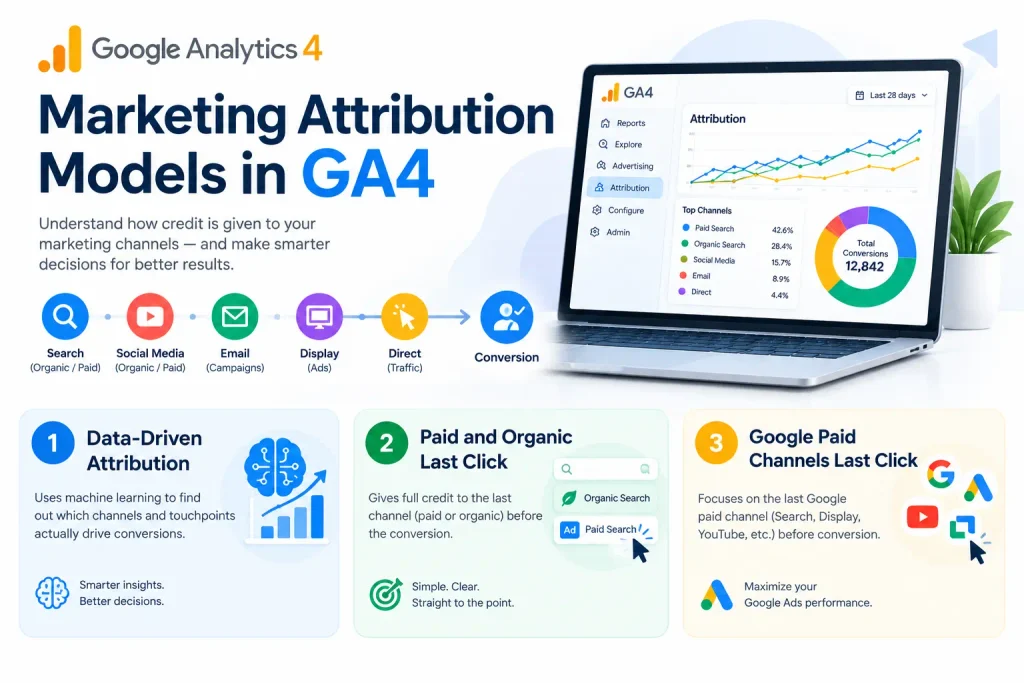
| Model | How it assigns credit | Best used for |
| Data-driven | Uses your account’s data to estimate each touchpoint’s contribution | Most businesses with enough conversion data |
| Paid and organic last click | Gives all credit to the last non direct click, paid or organic | Simple comparisons and low volume accounts |
| Google paid channels last click | Gives all credit to the last Google Ads click | Mazimize your Google Ads performance |
A few practical notes:
1. Data-driven attribution is generally the recommended default.
2. Low traffic or few conversions can make data-driven results less reliable. In that case, a
last-click view is a sensible cross-check.
3. Google Ads and GA4 can show different numbers for the same campaign, because
each may use different settings. Neither is automatically wrong.
4. Menu names change over time. What many guides call “Model comparison” now
appears as Attribution models under Advertising, and “Conversion paths” appears as
Attribution paths.
How I Audit Google Analytics 4 Digital Marketing Attribution (5 Steps)
I follow the same order every time. My main rule is simple: verify the data first, understand
the customer journey second, and make budget decisions only after reviewing the
evidence.
Step 1: Check the tracking setup
Confirm that GA4 is collecting data correctly. Make sure your key events are configured
and that important actions, such as purchases or lead form submissions, are recorded.
Step 2: Review campaign tracking
Check your UTM parameters. Traffic from Google Ads, email, social media, and other
campaigns must be categorized correctly. Inconsistent tags, such as “Email” in one
campaign and “email” in another, split your data and distort reports.
Step 3: Open the main GA4 reports
Start with the Traffic acquisition report to see which channels bring visitors to your site.
Then open the Advertising section and review the Attribution models and Attribution
paths reports. Together, they show how channels contribute to conversions.
Step 4: Compare attribution models
Look at how credit shifts between data-driven and last-click views. A big gap between the
two usually signals a longer, more complex customer journey. It also keeps you from
judging a campaign by a single report.
Step 5: Turn findings into action
Decide which channels deserve more investment, which campaigns need work, and which
tracking issues need fixing. An audit that doesn’t change a decision wasn’t worth running.
Common Digital Marketing Attribution Mistakes
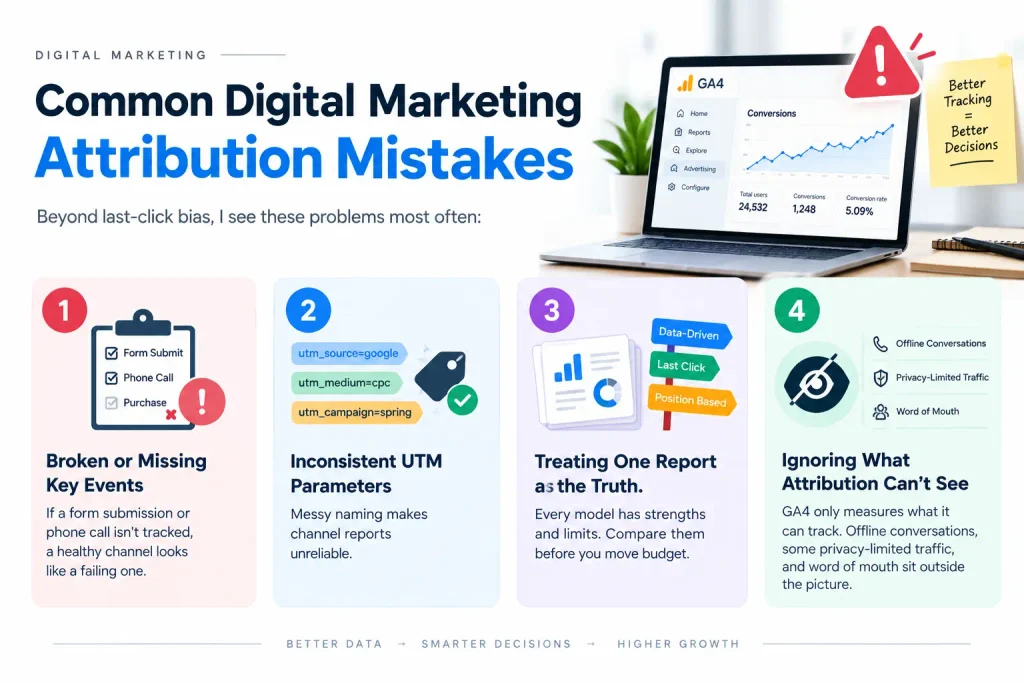
Beyond last-click bias, I see these problems most often:
1. Broken or missing key events. If a form submission or phone call isn’t tracked, a
healthy channel looks like a failing one.
2. Inconsistent UTM parameters. Messy naming makes channel reports unreliable.
3. Treating one report as the truth. Every model has strengths and limits. Compare them
before you move budget.
4. Ignoring what attribution can’t see. GA4 only measures what it can track. Offline
conversations, some privacy-limited traffic, and word of mouth sit outside the picture.
.
This are the common mistakes in Digital Marketing Attribution
The One Thing to Fix This Week
If you only have time for one fix, check your conversion tracking. Fix it before you optimize
any campaign.
Make sure your important actions, such as purchases, contact form submissions, and
phone calls, are tracked as key events. Then test each one yourself and confirm GA4
records it.
Why does this come first? Because missing conversions create false conclusions. You
might think a campaign is performing poorly when it is actually generating valuable leads
or sales. Reliable data is the foundation of effective attribution
Frequently Asked Questions
What is digital marketing attribution in simple terms?
It’s a way of working out which marketing channels and touchpoints helped create a sale
or lead, instead of crediting only the final click.
Which Digital Marketing attribution model should I use in GA4?
Most businesses start with data-driven attribution, then compare it with a last-click view.
If your site has low traffic or few conversions, treat data-driven results with extra caution.
Where do I find Digital Marketing attribution reports in GA4?
Open Advertising in the left menu, then go to Attribution. You’ll find the Attribution
models and Attribution paths reports there. Labels may change, so check Google’s
current help pages.
Why do my Google Ads and GA4 numbers not match?
They can use different attribution settings, lookback windows, and counting rules.
Compare them using matching settings before you decide anything is broken.
Conclusion: Make Digital Marketing Attribution a Habit
Digital marketing attribution won’t give you perfect answers. It will give you better
questions and fewer blind budget decisions.
Conclusion: Make Digital Marketing Attribution a Habit
Digital marketing attribution won’t give you perfect answers, but it will help you make smarter marketing decisions, understand customer journeys, and avoid wasting your advertising budget. By improving conversion tracking, maintaining consistent UTM parameters, and comparing attribution models, you can make data-driven decisions that support business growth.
If you’re looking for the Best Digital Marketer in Palakkad, understanding digital marketing attribution is essential for building effective campaigns, measuring performance, and maximizing return on investment (ROI).
Here are your key takeaways:
- Fix your conversion tracking before analyzing campaign performance.
- Keep UTM naming consistent to maintain accurate reporting.
- Compare data-driven and last-click attribution before evaluating a marketing channel.
- Analyze the entire customer journey instead of focusing only on the final click.
- Make advertising budget decisions based on reliable data and evidence.
Start with conversion tracking this week. Once your data is trustworthy, optimizing campaigns and improving marketing performance becomes much easier.